WELCOME
Perfect platform to learn
Perfect platform to learn

Important Notice
SAAC Site moved!
We have moved to a new domain: https://creating.meks.ng/saac
This domain: creat.i.ng/saac will retire for a while till we set it up for more specific use. CBT page for tests is now retired. This means it won't feature on new SAAC site. We are working on upgrading the existing CBT platform to more user friendly interface before deploying it on our server.
Holiday Assessments Overview
5 Juniors [>=95]: Ezema Daniella (98), Agboola Emmanuel (97), Ajibua Daniel (97), Obi Munachi (96), Udoabasi Blossom (95).
13 Seniors [>=290]: Adebisi Fareedah (300), Sojirin Momooreoluwa (300), Odekunle Deborah (300), Famakinwa Marvelous (300), Jombo Jordan (298), Ukpai Chioma (298), Owolabi Gabriella (298), Oje Fisayo (298), Emeriewen-Innocent O'Tega (296), Isaac Eniola (294), Okosun Davelyn (292), Adeola Divine (292), Adeniyi Ayoade (292).
We have not forgotten these students who showed resilience in completing the test with outstanding scores. All listed students will still get a treat at Tuck shop, with special consideration for the 4 students with perfect score of 300.
All Lesson Notes for the three terms are active and also downloadable for offline use. Prepare well and work hard to grab at least one prize this term.
Summary of 2025/2026 Second Term
We appreciate all the students who worked hard to attain higher grades. Consistency is very important for success. None of our difficult records were broken. However, 3 senior students tied as Term's best at 99%, the first of its kind. There was a significant improvement in general class performance in senior school.
Visit Stars Page to track pending list, and Timeline Page to see log of our prize Winners.
Terms Summary
Highlights of Second Term 2026
Overview of the students' overall performance. Individuals whose performances matched the items in prize categories are listed.
Summary of 2025/2026 Second Term
We appreciate all the students who worked hard to attain higher grades. Consistency is very important for success. None of our difficult records were broken. However, 3 senior students tied as Term's best at 99%, the first of its kind. There was a significant improvement in general class performance in senior school.
Junior Performance Breakdown
Term Best
- Ezema Daniella (JS 2 Kindness) - 98%
95 GTE
- Ezema Daniella (JS 2 Kindness) - 98%
- Afunaya Sharon (JS 2 Joy) - 97%
- Ezeike Ifechukwu (JS 2 Joy) - 95%
Best Class
JS 2 Joy - 75.9%
Senior Performance Breakdown
Term Best
- Ademola Favour (SS 1 Faith) - 99%
- Emerienwen-Innocent O'Tega (SS 1 Faith) - 99%
- Famakinwa Marvelous (SS 1 Faith) - 99%
95 GTE
- Ademola Favour (SS 1 Faith) - 99%
- Emerienwen-Innocent O'Tega (SS 1 Faith) - 99%
- Famakinwa Marvelous (SS 1 Faith) - 99%
- Udoabasi Anthonia (SS 1 Faith) - 98.5%
- Izegaigbe Sharon (SS 1 Peace) - 97.5%
- Adebisi Fareedah (SS 1 Goodness) - 97.5%
- Okosun Davelyn (SS 1 Faith) - 97%
- Iheukwumere Nathaniel (SS 1 Goodness) - 97%
- Adekanmbi Inioluwa (SS 1 Peace) - 96.5%
- Odekunle Deborah (SS 1 Faith) - 95%
- Ukpai Chioma (SS 1 Faith) - 95%
Best Class
SS 1 Faith - 98.7%
Pending Rewards
The students listed on the Stars page will receive their rewards as queued, as soon as the needed resources are available. We are working hard to clear the build up. Do bear with us.
Literary Assets
List of Books wriiten by students along side the summary, photo and purchase link.
Book Gallery
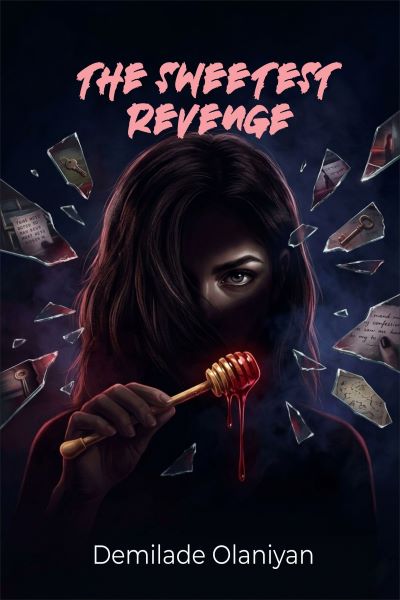
The Sweetest Revenge
Demilade Olaniyan
When a single event brings two strangers together, no one expects them to become inseparable. But in the world of secrets, trust is the most fragile thing of all.
Purchase
Repercussion
Demilade Olaniyan
Rich in Nigerian culture and wisdom, this 83-page masterpiece is a stirring reminder that trust, once broken, can shape destinies, and that even the youngest among us can rise above failure to become great.
PurchasePageant
Update on Pageant segment of variaty day. The Winner and Runner-Ups.
Damifunre Onyekoya retained the Miss SAAC (9th Generation), while Hameerah Osho and Munachi Jue-Nwokolo still the Runner-Ups. View About and History of the Pageant. No new contestant was recorded.
Archives
Records that showcase the exploits achieved by students in the past, which you need to know.

Group 6 members won the AI Prompt challenge during the Coding session on the 4th day of training. Their names will be remembered for a very long time.
The Members are: Adesina Emmanuel, Levis Giiovanni, Erhabor Efosa, Akele Jessica, Oje Fisayo, Esele Idogen, Musa Precious, Alofe Precious, Okeke Daniel, Anyaogu Pascal, Adeola Tireni, Awotayo Mofiyin, Aden Eyitoyosi, Atakiti Gabriel, Sojinrin Momooreoluwa and Augustine Kamsi.
Site Tips
Tips on using this site and latest updates.
What's New
Sinmi is the new face of this platform. Our cover photos for home page were also updated.
How to view Lesson Notes
Click on "Lessons" button at the beginning of this page. The Timeline page will open to display a chronological record of resources. Find your Class Lessons link and click on it. It will take you to the appropriate page to view all included files.
Lesson Notes can be assessed from the PDF button. Other resources to enhance learning may be included such as: Images, Audios, Videos or Zips. If on mobile, ensure you use the icon to magnify the view or hold your device in landscape position.
Steps to make Profile visible
By default, all accounts are hidden until the user creates a profile page. To create your profile:
- Click on the avatar at top right
- Click on Dashboard
- Click on Settings (on the left menu panel)
- Click on My Profile
- Click on "New Profile" button
You may disable / enable the display of some information on your profile by toggling them on the "My Settings".
Prize Categories
There are 6 major Prizes available to students per term. The rest are either seasonal or awarded as the need arises. These prizes are available to both JSS 2 & SS1 students.
Session Best
Students with the highest score for the session.
Term Best
Students with the highest score for the term.
95 GTE
Students with greater than or equal to 95% score for the term.
Perfect 60
Previously 60/60, students with perfect exam score of 60 over 60 for the term. This rarely occurs. When it does, attracts more recognition.
Perfect 100
Students with perfect total score of 100 for the term. This is the latest added category, and is very rare. When it does, attracts more recognition.
Best Class
The class with highest calculated score for the term based on total number of As, Bs and Cs, using the actual number who sat the exam as base factor.
Impressive Performance
Students with huge improvement that broke a record or nearly did. This category is awarded with descretion.
Easter Winners
Easter Contest attracts entries from students (Junior & Senior) on a given task (e.g. card design), which are fed into our voting system. Students with highest weighted scores are crowned.
Christmas Winners
Christmas Contest is scheduled before Christmas, where students submit entries on a given task (card design, doc or media creation). Our voting sytem helps the students decide who wins the contest.
Easy Finder
Find a User, Post or Page by clicking the search icon in the top menu. Users with active profiles may be found on the profile page.
View ProfilesHelp Center
Our Frequently Asked Questions will get you started on finding right answers. You may reach us through calls and mails too.
Read FAQNotifications
Stay up to date on the latest information on this platform. Don't miss out from the next news update.
View Latest NewsGallery Photos

What our users are saying
The app is really nice and interesting and I will love it more better if there was a page were all users can communicate and shear all there ideas .

The app is nice , fun and interactive, but in still needs work like new icons for gaming, an ai chat for understanding school work, tests and exams for different subject not only prioritized on Computer.
Subscribe our newsletter
Stay up-to-date on news and updates about our products & services by email.
We will never spam or share your email under any circumstance.